Sales Manager Setup Guide
Connect a number → Turn on Sales Manager → Capture & qualify leads in 5 steps
Step 1
Connect your WhatsApp number
- Go to Dashboard → Your Numbers → Connect a number.
- Choose a plan: Developer (API + webhooks), WATZAP Pro (Sales Manager engine) or AI Sales Pro (a zero-setup AI agent — AI works for you).
- Name the number and confirm. Scan the QR or use the pairing code to link WhatsApp.
Step 2
Add your trigger phrases
- Open Dashboard → Your Numbers → [Your number] → Sales Manager.
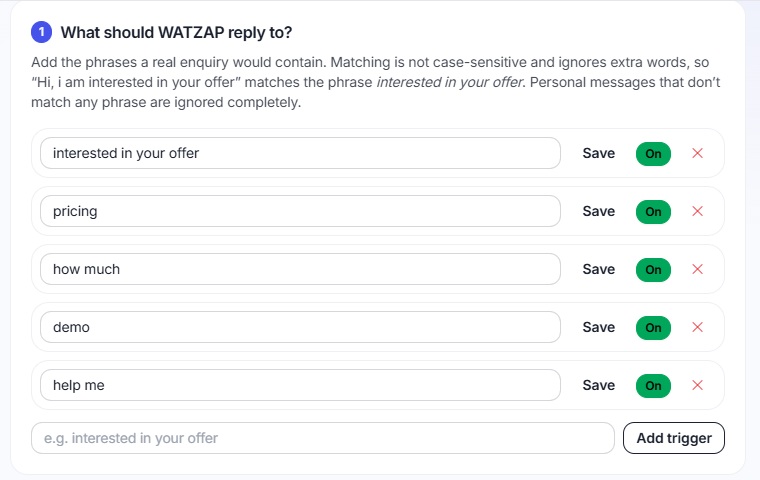
- Under Trigger phrases, type the words a lead would send when they're interested — e.g. "price", "I want to buy", "interested".
- Add several: matching is automatic as soon as a message contains the phrase (any capitalisation, extra words are fine).
- Save — the engine watches every incoming message for these words.
Step 3
Write the instant reply (greeting)
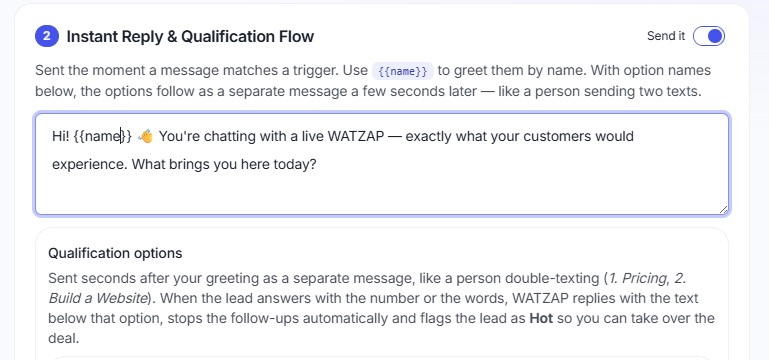
- In Instant reply, write the first message a lead receives the moment they hit a trigger.
- Use
{{name}}to greet them by their WhatsApp name automatically. - Keep it short and human — a short random delay (a few seconds) is added automatically so it doesn't look robotic.
Step 4
Set up qualifying questions & answers
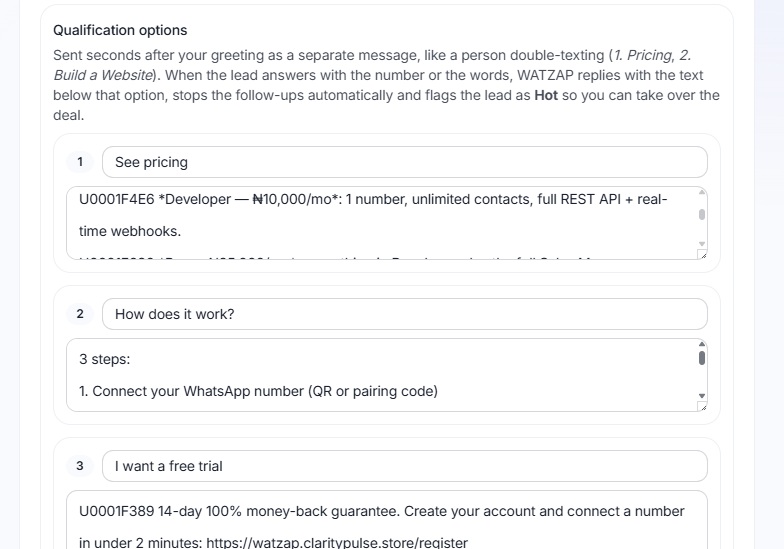
- Under Qualification options, add up to 5 numbered choices (e.g. 1. See pricing, 2. How it works, 3. Book a demo).
- For each option, write the answer WATZAP sends when the lead picks it.
- WATZAP sends the options right behind the greeting as a separate message — exactly how a real salesperson double-texts.
- When a lead picks an option, they're flagged Hot, remaining follow-ups stop, and you take over the chat.
- On AI Sales Pro? Skip this step — the AI qualifies automatically, no questions to set up.
Step 5
Capture, qualify & follow up
- Add Follow-up nudges (e.g. after 10 minutes, 2 hours, 1 day) so silent leads get a polite nudge — any reply cancels them.
- Watch leads move: New → Qualifying → Hot lead → Ghosted → Closed.
- Go to Leads to open a hot lead and take over the chat only when they're ready.
- Toggle Sales Manager ON at the top if it isn't already — then it's live.
AI Sales Pro
Going hands-free: the AI Sales Agent
On AI SALES PRO there are no qualifying questions to configure — the AI does the qualifying. You only set a trigger message and describe your business; the AI answers questions, recommends the right product, handles objections and shares your payment details to close the sale.
- Trigger message — e.g. "price". Any message containing it is captured as a lead and the AI takes over from there.
- Business Context — fill the simple form (AI Sales Manager → Business Context). Example:
Business Name: Chi's Wigs
Niche/Industry: Hair & beauty, fashion
Products & Prices (keep it simple):
  Bone straight wig 16" — ₦45,000
  Bone straight wig 20" — ₦60,000
  Frontal install — ₦15,000

Payment Details/Options:
  Bank transfer — GTBank 0123456789, Chi's Wigs

Delivery & Location Info (if applicable):
  Lagos delivery ₦2,000 (1–2 days). Pickup at Lekki Phase 1.
- Save — WATZAP automatically creates an Automated Sales Nudge Sequence from your context. Edit any nudge as you like.
- Toggle Sales Manager ON. That's it — your AI agent now chats, qualifies and closes while you watch the lead pipeline: Hot → Ghosted → Closed.
- If a buyer asks for a human, the AI flags the chat and you take over instantly.
Want to start on a lower plan? Upgrade to AI Sales Pro anytime from Your number → Plan — you only pay the difference from your wallet.
14-Day 100% Money-Back Guarantee. If WATZAP doesn't qualify your leads and save you time, send us a quick message for a full 100% refund.